Agent-based governance
Capsule Services connect to Opstage through an embedded Agent SDK.
Learn more
Connect small services, automation workers, integration services, and agent runtimes to a unified Opstage console through an embedded Agent SDK.
Public Review
Xtrape Capsule is currently in Public Review before the v0.1.0 Public Preview release.
APIs, contracts, deployment instructions, and SDK interfaces may still change.
Recommended for
Not recommended for
See the Roadmap for what's planned next.
Xtrape Capsule is an open governance system for the long tail of small services that power modern AI products — integration adapters, automation workers, background jobs, private tools, and AI Agent runtimes.
Instead of stitching together a service mesh, a config center, a monitoring stack, and a backstage, you get one lightweight control plane that speaks to your services through an embedded Agent.
Capsule Service ──[Agent SDK]──▶ Opstage Backend ◀── Opstage UI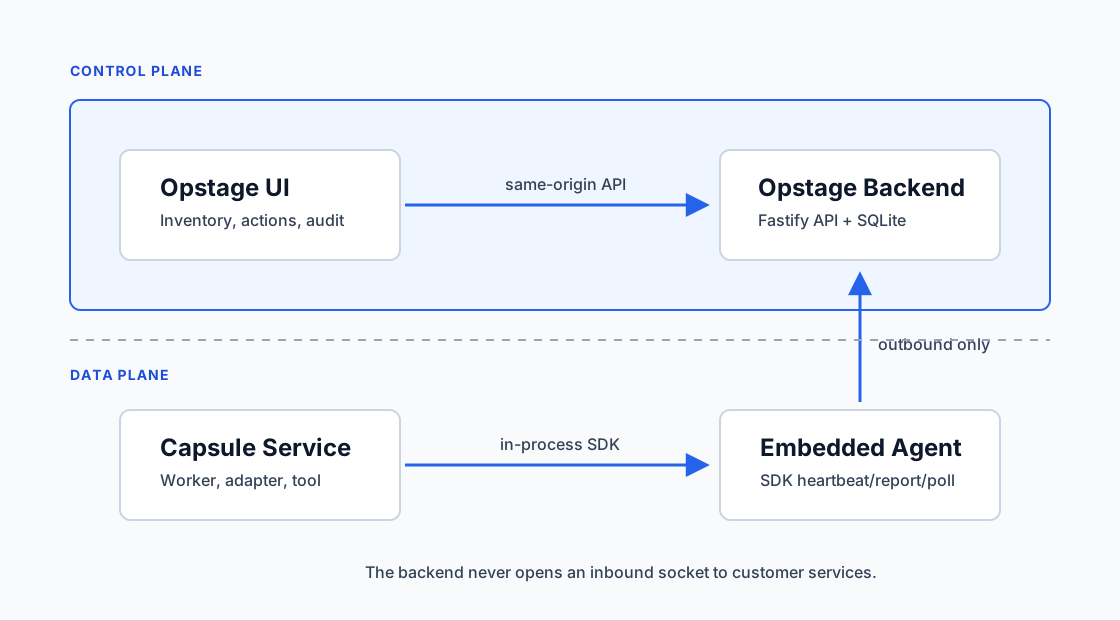
Most "services" in an AI product are not classic microservices. They are:
These deserve runtime governance, not heavy platform engineering. Capsule Services are designed to be registered, observed, configured, operated, and audited — without giving up their lightweight nature.
Opstage is an agent-based runtime governance control plane for Capsule Services.
Opstage 是面向 Capsule Service 的 Agent-based 运行态治理控制面。
Opstage gives you a clear, single-pane view of every Capsule Service across your fleet — what's online, what's healthy, what config it's running with, what actions it exposes, and what commands have been executed against it.
+---------------------+
|     Opstage UI      |   ← human operator
+----------+----------+
           |
           v
+---------------------+
|  Opstage Backend    |   ← control plane
+----------+----------+
           ^
           |  outbound only
           |
+----------+----------+
|  Embedded Agent     |   ← data-plane agent
+----------+----------+
           |
           v
+---------------------+
|  Capsule Service    |   ← the thing being governed
+---------------------+
The Backend never opens a socket to your services. All connections are initiated outbound by the Agent, which is what makes Opstage runnable behind NAT, on a laptop, or inside customer environments.
git clone https://github.com/xtrape-com/xtrape-capsule-ce.git
cd xtrape-capsule-ce
docker compose -f deploy/compose/docker-compose.yml up --build -d
Open http://localhost:8080 and sign in with the bootstrap admin account.
Public Review Docker path
During Public Review, the source-build Docker Compose path remains the canonical quick-start path. GHCR images may be produced from main for validation, but the stable ghcr.io/xtrape-com/xtrape-capsule-ce:0.1.0 image becomes the primary documented path only after the v0.1.0 Public Preview cut.
import { CapsuleAgent } from "@xtrape/capsule-agent-node";

const agent = new CapsuleAgent({
  backendUrl: process.env.OPSTAGE_BACKEND_URL!,
  registrationToken: process.env.OPSTAGE_REGISTRATION_TOKEN,
  tokenStore: { file: "./data/agent-token.txt" },
  service: {
    code: "my-capsule",
    name: "My Capsule Service",
    version: "0.1.0",
    runtime: "nodejs",
  },
});

await agent.start();
→ Build your first Capsule Service
| Edition | Status | Audience |
|---|---|---|
| CE — Community Edition | Public Review | Individuals, small teams, self-hosted private services |
| EE — Enterprise Edition | Planned | Companies needing RBAC, SSO, HA, secret vault, central logs |
| Cloud | Future | Teams who don't want to self-host |
Xtrape Capsule is currently in Public Review before the v0.1.0 Public Preview release. See the full roadmap for what's planned next.