Quick Start
This guide gets Opstage CE running locally in about 5 minutes.
What you'll have at the end
- An Opstage CE control plane running on
http://localhost:8080 - A persistent SQLite database under
/app/datainside the container - A bootstrap admin account ready to sign in
- A console where you can create registration tokens for your Capsule Services
Prerequisites
- Docker 20.10+ (or Docker Desktop)
- 200 MB free disk for the image, ~50 MB for the SQLite data volume
- A free local port (default
8080)
You do not need Node.js, a database server, or a reverse proxy to
run Opstage CE. The container is self-contained. :::
Public Review Docker path
During Public Review, the source-build Docker Compose path remains the canonical quick-start path. GHCR images may be produced from main for validation, but the stable ghcr.io/xtrape-com/xtrape-capsule-ce:0.1.0 image becomes the primary documented path only after the v0.1.0 Public Preview cut.
Recommended - Docker Compose from source
git clone https://github.com/xtrape-com/xtrape-capsule-ce.git
cd xtrape-capsule-ce
cp .env.example .env
# edit OPSTAGE_ADMIN_PASSWORD and OPSTAGE_SESSION_SECRET in .env
docker compose -f deploy/compose/docker-compose.yml up --build -d
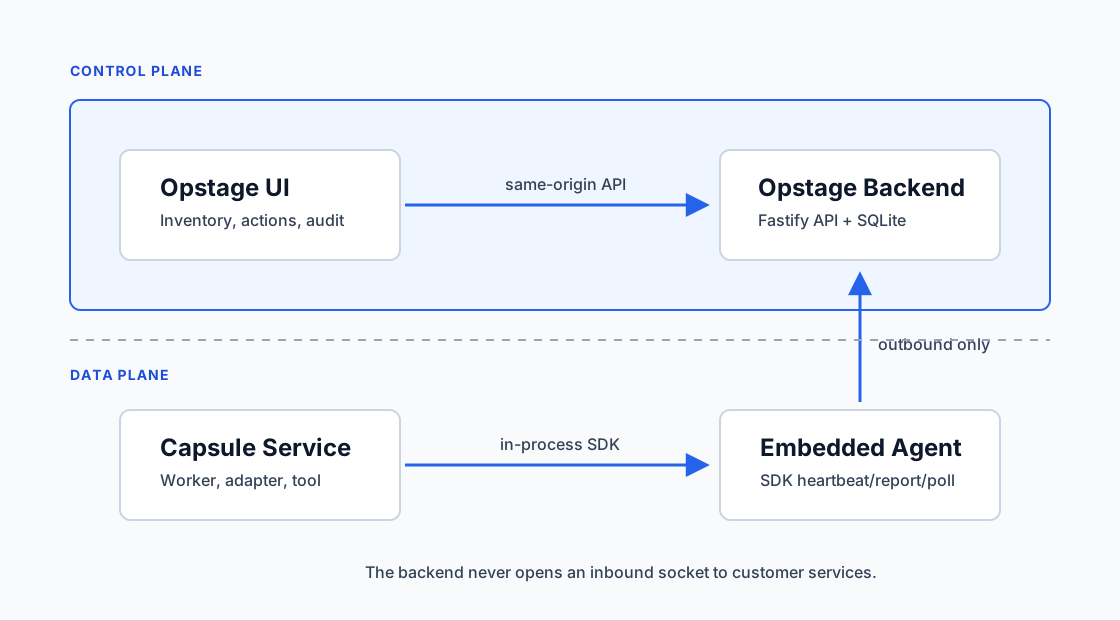
The compose file builds Opstage CE locally, mounts a data volume, and exposes port 8080.
Default access
| Item | Value |
|---|---|
| URL | http://localhost:8080 |
| Username | OPSTAGE_ADMIN_USERNAME (default: admin@example.local) |
| Password | OPSTAGE_ADMIN_PASSWORD (default: ChangeMeBeforeRunning123!) |
The bootstrap username and password are used only when the
database is empty. Changing the env vars later does not reset an existing admin account. Rotate OPSTAGE_SESSION_SECRET and the admin password before exposing Opstage to anything beyond localhost. :::
Data persistence
All state lives in /app/data inside the container:
/app/data/
└── opstage.db      # SQLite database
Mount a named volume (or a host directory) to keep your data across container restarts:
-v opstage-data:/app/data        # named volume
-v /opt/opstage:/app/data        # host bind mount
Next steps
Stop and clean up
# stop
docker stop opstage-ce && docker rm opstage-ce

# wipe data (irreversible)
docker volume rm opstage-data
Common issues
Port 8080 is in use. Map a different host port: -p 9090:8080.
Forgot the bootstrap password. It cannot be re-derived from env vars after first start. The simplest reset path in CE is to wipe the SQLite volume and start over.
Container restarts in a loop. Check docker logs opstage-ce — usually a missing or too-short OPSTAGE_SESSION_SECRET.
Cannot reach /api/admin/auth/me. Make sure cookies are accepted (the Admin UI relies on session cookies + CSRF tokens).